
Your pickleball, in one place.
Find a tournament near you, enter as a pair, follow your matches on tournament day, take your place at your club's sessions and log your friendly matches. On iPhone, Android and in the browser.
- Tournaments near you
- “Your turn” when your court is ready
- Your numbers, match after match
On iPhone and Android. Or, with nothing to install, straight in the browser.


01 · Find a tournament
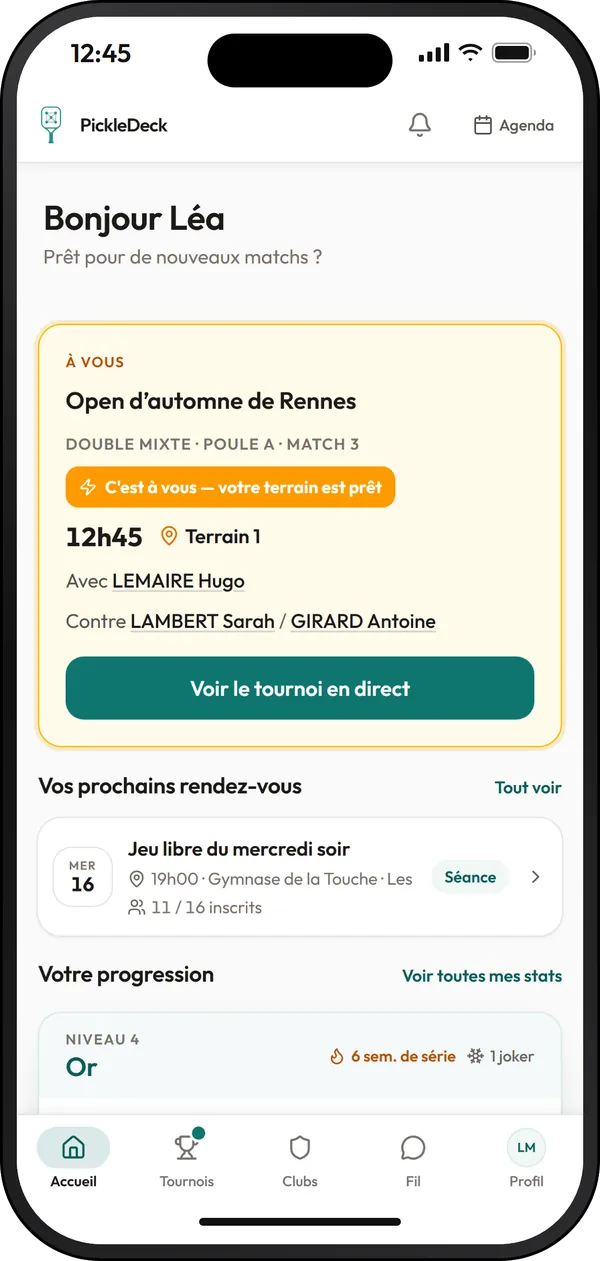
Tournaments near you, in one tap.
The Tournaments tab lists open tournaments with their date, venue, number of entries and price. “Near me” keeps those in your region, and the filters do the rest. Each card tells you in advance what entering will require.
The region in your profile is enough: “Near me” does the sorting
Included in this section
- Search by name, and the “Near me”, “This month” and “Next month” shortcuts
- Filters: region, tournament level from club to federal, event, age, dates
- On each card: date, venue, entries, price and entry status
- “FFT licence required” shown before you do anything
- The tournament page: the essentials (dates, venue, price, events), then the players, pools, draws and results
- Three tabs: Live, My tournaments, Find a tournament
02 · Enter as a pair
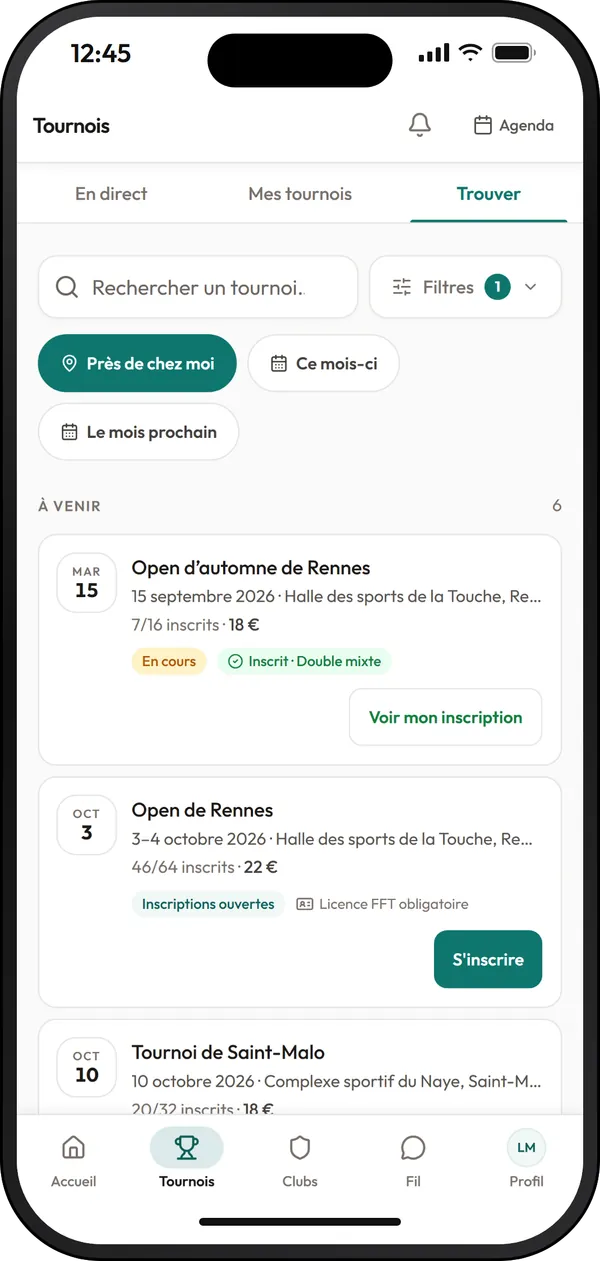
Entering as a pair, even without a partner.
Entering takes three steps: Events, Players, Payment. When asked “Who are you playing with?”, name your partner: the pair is formed as soon as they enter and name you. Without a partner, post a notice and choose from the available players.
The pair forms on its own once each player has named the other
Included in this section
- “I know my partner”: their name, and their email (optional) to let them know a place is reserved for them
- “Chloé Bernard has invited you!”: the invitation is waiting for you in the app, and “Join” forms the pair
- “I'm looking for a partner”: your notice, the list of available players and “Team up”
- A “Team up” request waits 48 hours for the other player's answer
- Payment depending on the tournament: card, HelloAsso, on site or by bank transfer
- Extra options, promo code, and a waiting list when the event is full
- Each player can pay their share: “Pay my share” appears on the home screen
- My tournaments: your entries, your position on the waiting list, and “Withdraw” as long as nothing has been paid
03 · Tournament day
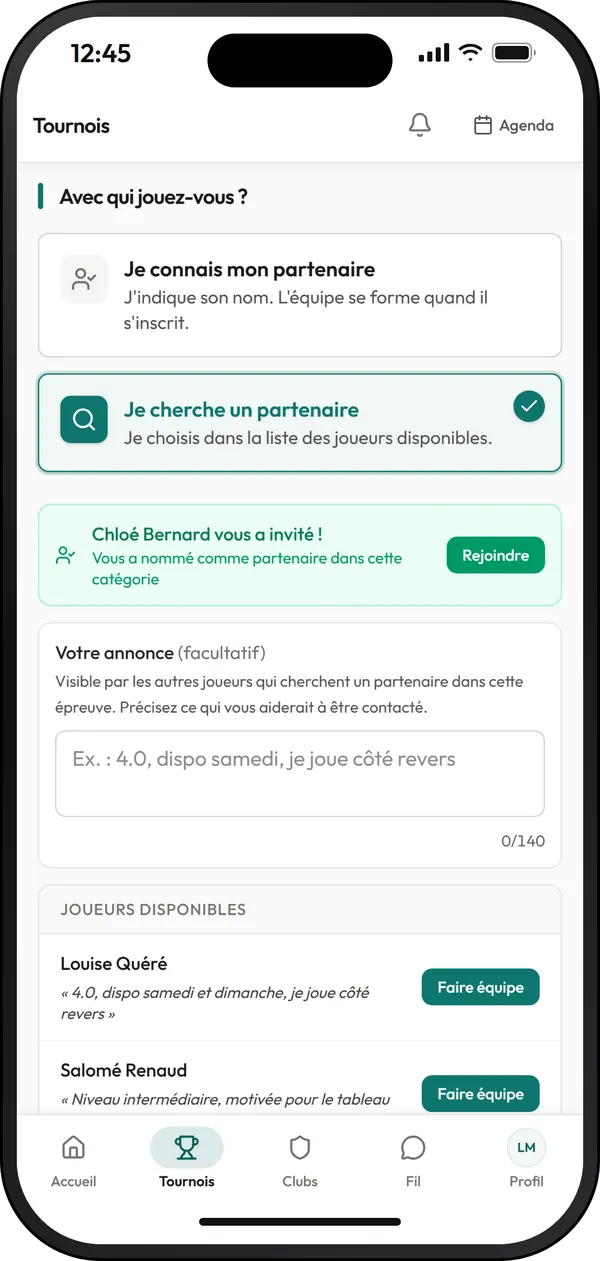
On tournament day, the app tells you when it's your turn.
The “Your turn” card sits at the top of the home screen: your next match, the time, the court, your partner and your opponents. When your court frees up, it switches to “It's your turn: your court is ready”, and a notification lets you know.
Your match, your court and your opponents, at the top of the home screen
Included in this section
- The day before: “It's tomorrow”, with the time of your first match
- A quarter of an hour before: “Warm up!”
- The court queue: “Your turn in 2 matches · Court 3”, then “It's your turn!”
- “2 more matches before yours on this court”, and the estimated time when the tournament runs late
- Every change is flagged to you: court, time, delay, message from the organiser
- Match times: every match of the tournament and its time
- Notifications arrive in the app, on iPhone and Android, and in the browser on a computer and on Android
04 · The score
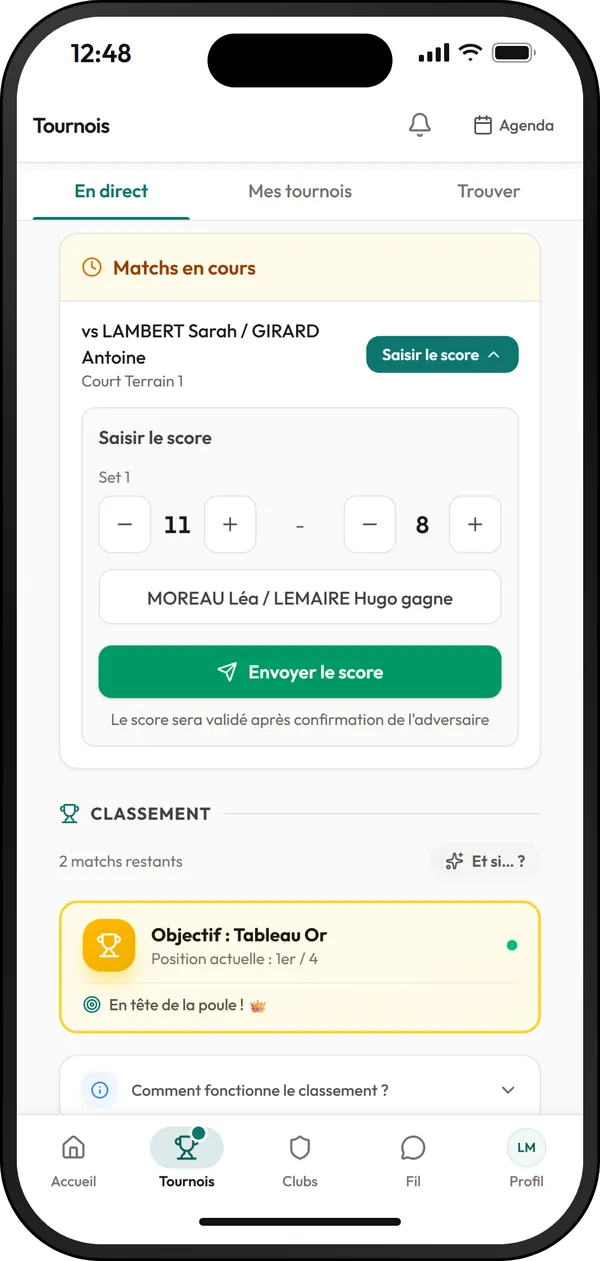
The score, entered from the court.
When the organiser opens score entry to players, the score is sent from the app at the end of the match. The opponent confirms or disputes it, and the pool standings follow.
Patchy signal? The score waits, and goes as soon as the network is back
Included in this section
- An organiser option, with three ways to confirm: by both teams, automatically after a delay, or by the organiser
- The opponent confirms or disputes, and you are notified with “Score confirmed”
- Patchy signal in the sports hall: a score that doesn't go through is kept, then sent on its own when the network is back
- Your pool standings and your target, just below
- Your tournament matches feed into your statistics
05 · Match tracking
The whole tournament, match after match.
Match tracking shows what is being played: matches in progress, pools, courts, draws and honours. Search for a player to follow their matches, and share the tournament with your family and friends, who can follow it without creating an account.
Your family and friends follow your matches without creating an account
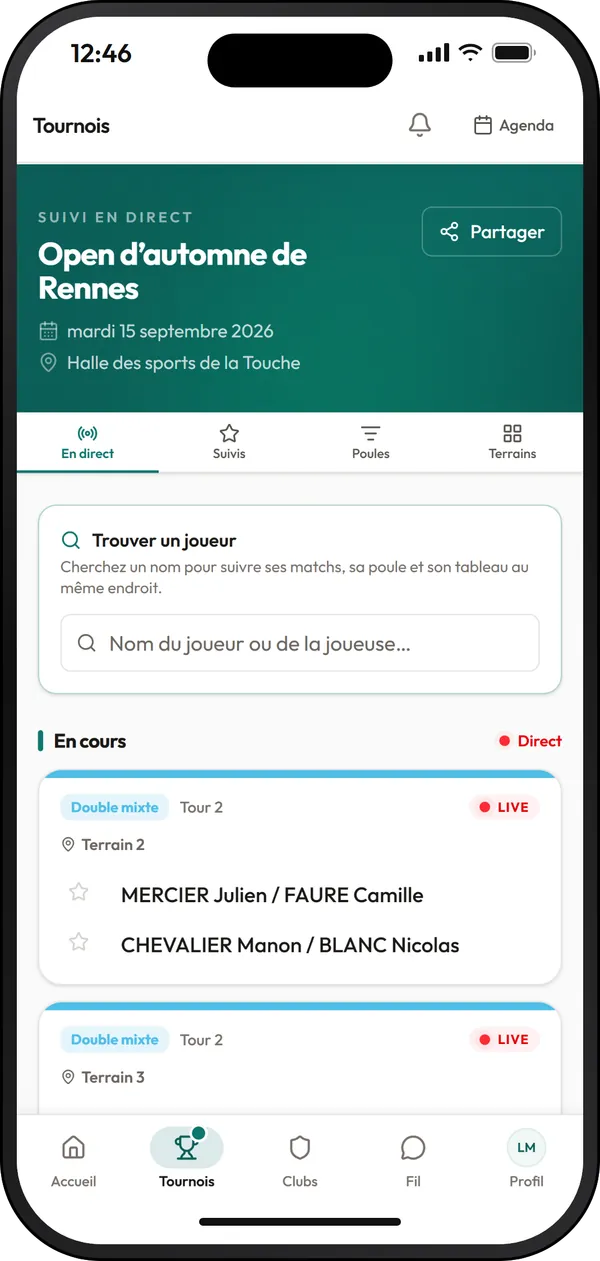
Included in this section
- Six views: Live, Followed, Pools, Courts, Draws, Honours
- “Find a player”: their matches, their pool and their draw in one place
- Followed: the players you have starred
- Share the tracking: your family and friends watch it without an account
- On tournament day, the Tournaments tab opens on your tournament, live
- After the tournament, “My recap” retraces your run in six screens
06 · Club sessions
Your place at club sessions.
In the Clubs tab, find your club's sessions: open play, americano, up and down the river, Swiss rounds or round robin. The price and level are shown before you sign up, and when a session is full, the waiting list offers you the place that frees up.
The price and level are shown before the “Sign up” button
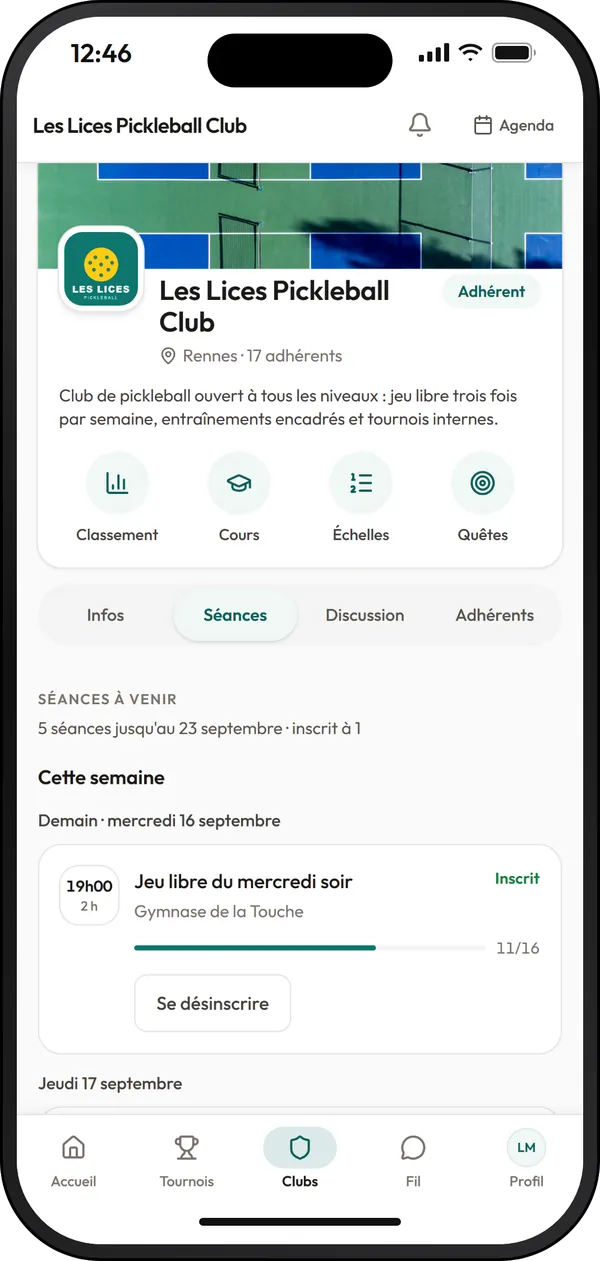
Included in this section
- “Sign up” and “Cancel” in one tap; a late cancellation may count as an absence
- Waiting list: “A place is held for you until…”, to take or to decline
- Bring a guest, within the limit set by the club
- On the evening of the session: your round, your court, who with and who against
- A session match earns XP and feeds into your statistics
- The club page: Info, Sessions, Discussion, Members, plus its ranking, lessons, ladders and quests
- Join an open club in one tap, or ask for your place when membership needs approval
07 · Friendly matches and connections
Your matches with friends count too.
“Log a match” opens a short sheet: the format, the players, the score. Your usual partners and opponents are suggested automatically. The opponent confirms the score, and the match feeds into your statistics, your XP and your friends' Feed.
Confirmed by the opponent, or automatically on the fourteenth day: no match is left hanging
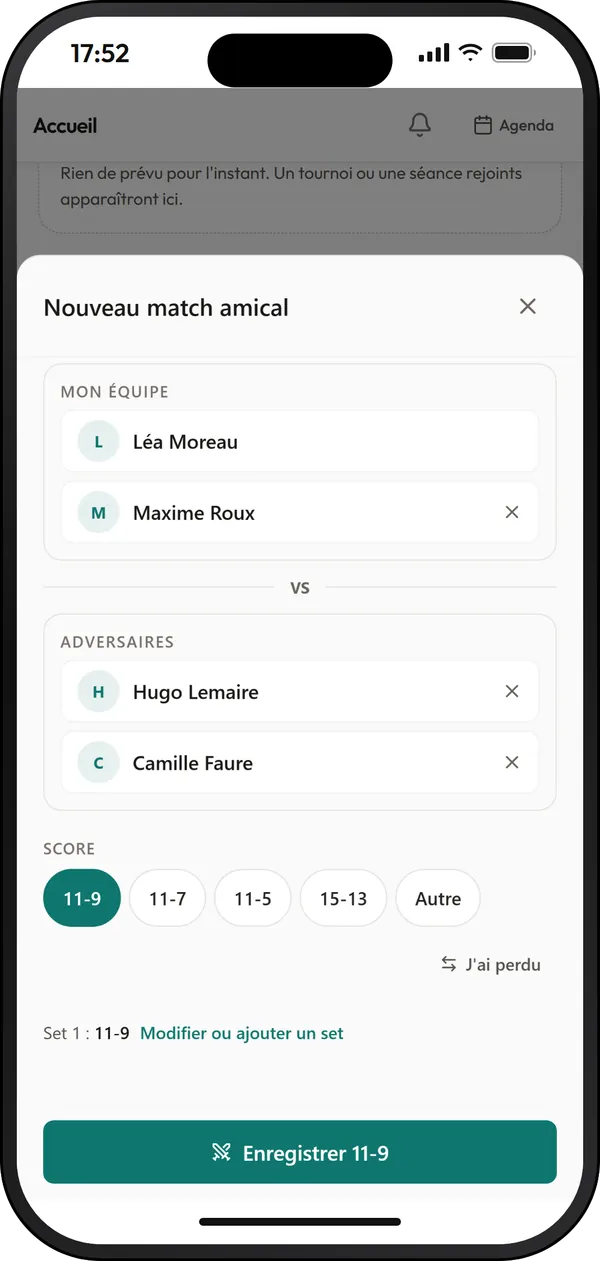
Included in this section
- Singles, doubles or mixed doubles, with registered players or guests without an account
- The score in one tap: 11-9, 11-7, 11-5, 15-13, or “I lost” to flip them
- A single opponent confirms the score; “Remind” once a day if they are slow
- No answer: a reminder after three days, then the match is confirmed automatically on the fourteenth day
- Disputed score: whoever entered it corrects it, and the opponent confirms it again
- “Follow” a player: when you follow each other you are friends, and “My connections” brings them together
- The Feed: your friends' confirmed matches, badges and sessions, with “Well done” and “Comment”
- “Looking for partners” in the Feed: your friends reply “I’m available”
08 · Your numbers
Your numbers, match after match.
“My numbers” brings together your tournament, session and friendly matches: matches played, win rate, streak, tournaments. A filter separates official from friendly, and “Detailed statistics” goes further.
Official and friendly, separated in one tap
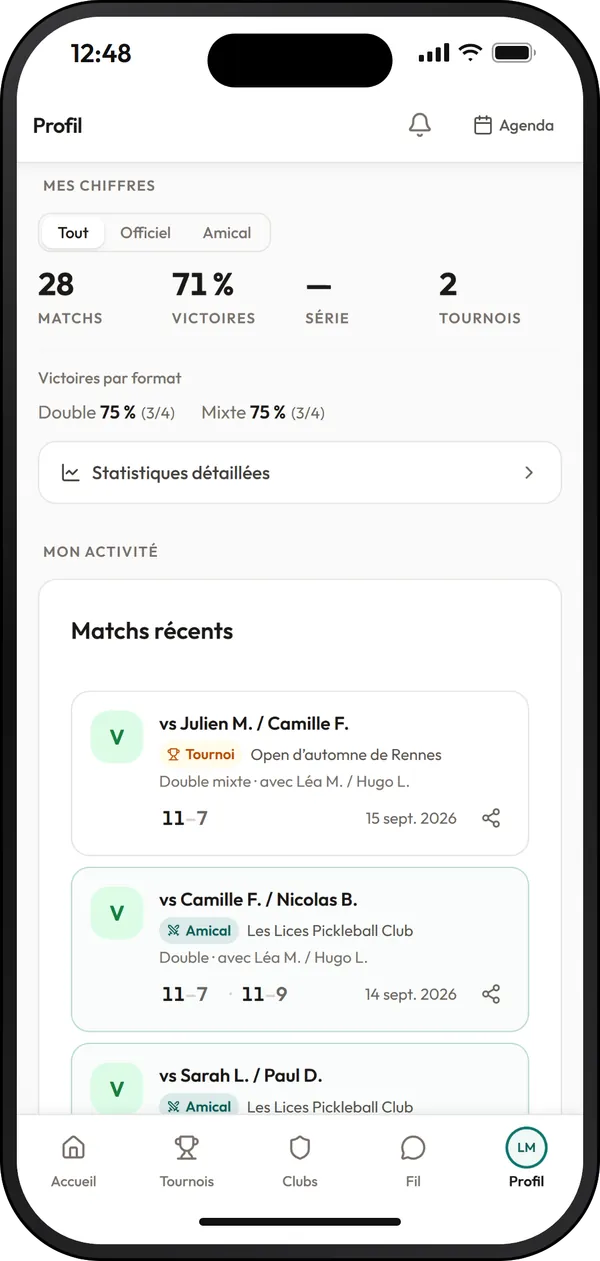
Included in this section
- All, Official, Friendly filter, from your first completed sanctioned tournament
- Wins by format: singles, doubles, mixed doubles
- Detailed statistics: your form over the last ten matches, your last twelve months, your playing days, the record book
- Your favourite victims, your bogey players and your winning pairs
- Consistency: your matches over the last twelve weeks
- Tournaments played: summary, final standings and match details
- “Share this match”: an image ready for your stories
- “My year”: the summary of your friendly matches, with your partner of the year
09 · Your progress
XP, levels, and a streak to keep up.
Every confirmed match, every session, every completed tournament earns XP. Seven levels take you from Beginner to Legend, and the streak is counted in weeks: one confirmed match a week keeps it going, and a joker covers a week without playing.
The streak is counted in weeks, and a joker protects it
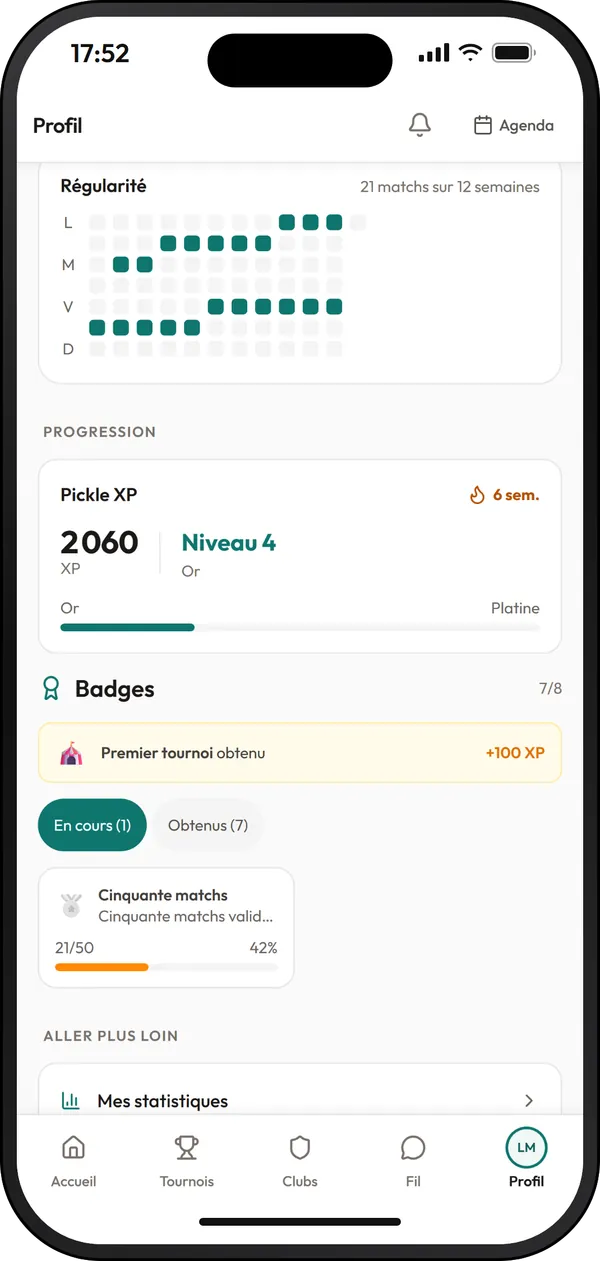
Included in this section
- XP for your confirmed matches, your sessions, your completed tournaments, your badges, quests and your club's ladder challenges
- Seven levels: Beginner, Bronze, Silver, Gold, Platinum, Diamond, Legend
- The streak: at least one confirmed match a week; one joker a month, two at most in reserve
- Badges to unlock, with your progress towards the next one
- Rankings among friends, in your club, and between clubs
- Three monthly challenges, the same for everyone
- On Sundays, a notification sums up your week: matches, wins, XP
10 · FFT and DUPR
Your FFT licence and your DUPR account, linked.
Your licence links your account to your ranked player record: level, national rank and points by discipline. “Link my DUPR account” goes through DUPR's sign-in window, and your ratings then show on your profile.
Linking your DUPR account means you agree: unlinking it stops all sending
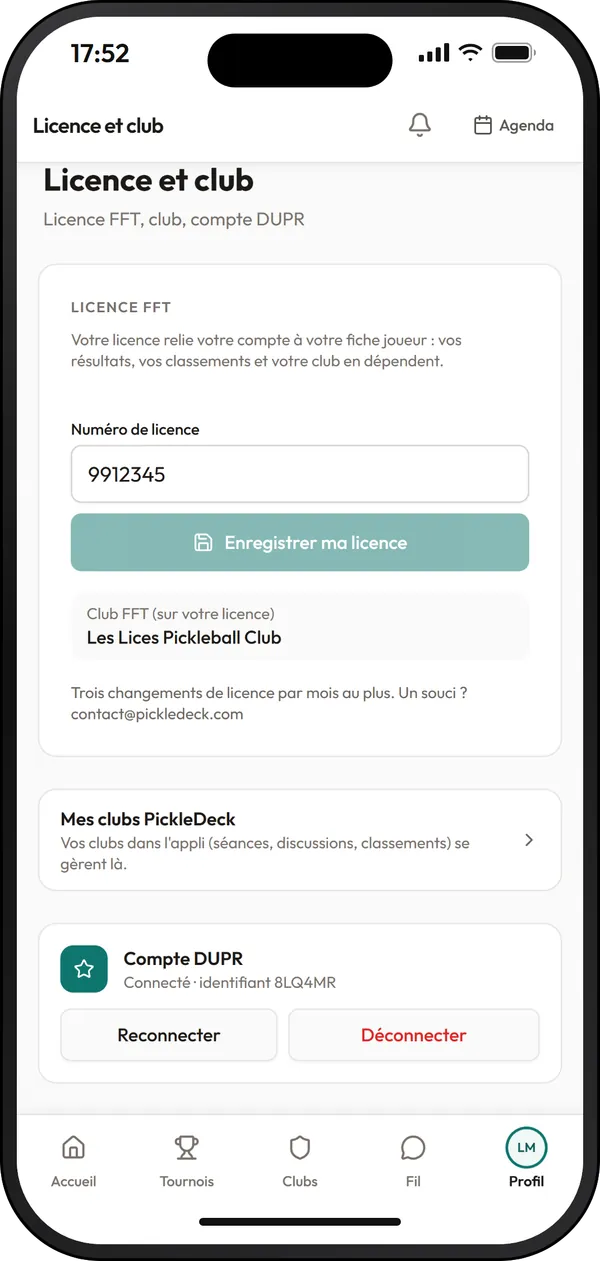
Included in this section
- Your FFT licence and club, in Settings, Licence and club
- FFT-ranked: your public record pickledeck.com/players/fft/<licence>, findable in the player directory
- FFT rankings, August 2026 publication: level, rank and points by discipline, and your progress since February 2026
- The directory searches by name, league, club or level
- Your DUPR singles and doubles ratings on your profile, kept up to date by DUPR
- The DUPR access token is encrypted in the database and never read back by the app
- Your results go to DUPR when the tournament organiser sends them, or after a session if your club has set it up that way
- Nothing is sent without your DUPR account linked, and unlinking it stops everything. Friendly matches are not sent to DUPR
Your data
Your data, your settings.
Everything is set in the app, from Settings: who sees what, what you receive, your data and your account.
What you control yourself
- Privacy: your profile public or not, and eight boxes to choose what your record shows
- What your Feed shares: with no one, with your friends, or with your friends and followers
- Your data in one file (JSON), to download from the browser
- Account deletion in Settings, Account: your password, then “DELETE” to type in
- Block a player, and withdraw your image rights tournament by tournament
- Database in Dublin, app served from Paris; your data is never sold or rented
At a glance
Everything PickleDeck does for players.
Ten areas, all included from sign-up, with nothing to unlock.
The pickleball app designed for players.
Available on the App Store and Google Play, or instantly accessible as a web app with nothing to download, for quick access on court. The same account everywhere.